Grant and revoke access
Access control is off by default (acl.enabled=false). Set QOD_ACL_ENABLED=true to enforce it. When ACL is on, every FlightSQL statement is matched against the caller's effective permission set before execution. The model - roles, groups, verbs, and wildcards - is described in Access control model.
Grant a team read access
Goal: Let a group of users run SELECT statements against one or more tables in a pool.
Prerequisites: A tenant and a pool already exist. You are signed in as a superuser or the tenant's admin.
Steps (UI):
-
Open the Users section (top nav) and select the target tenant from the tenant selector.
-
Go to the Roles tab and click + New role. Give the role a name (for example
bi-readers). Add a table permission with verbRO(read) and the target catalog, schema, and table (use*to wildcard any field). Save.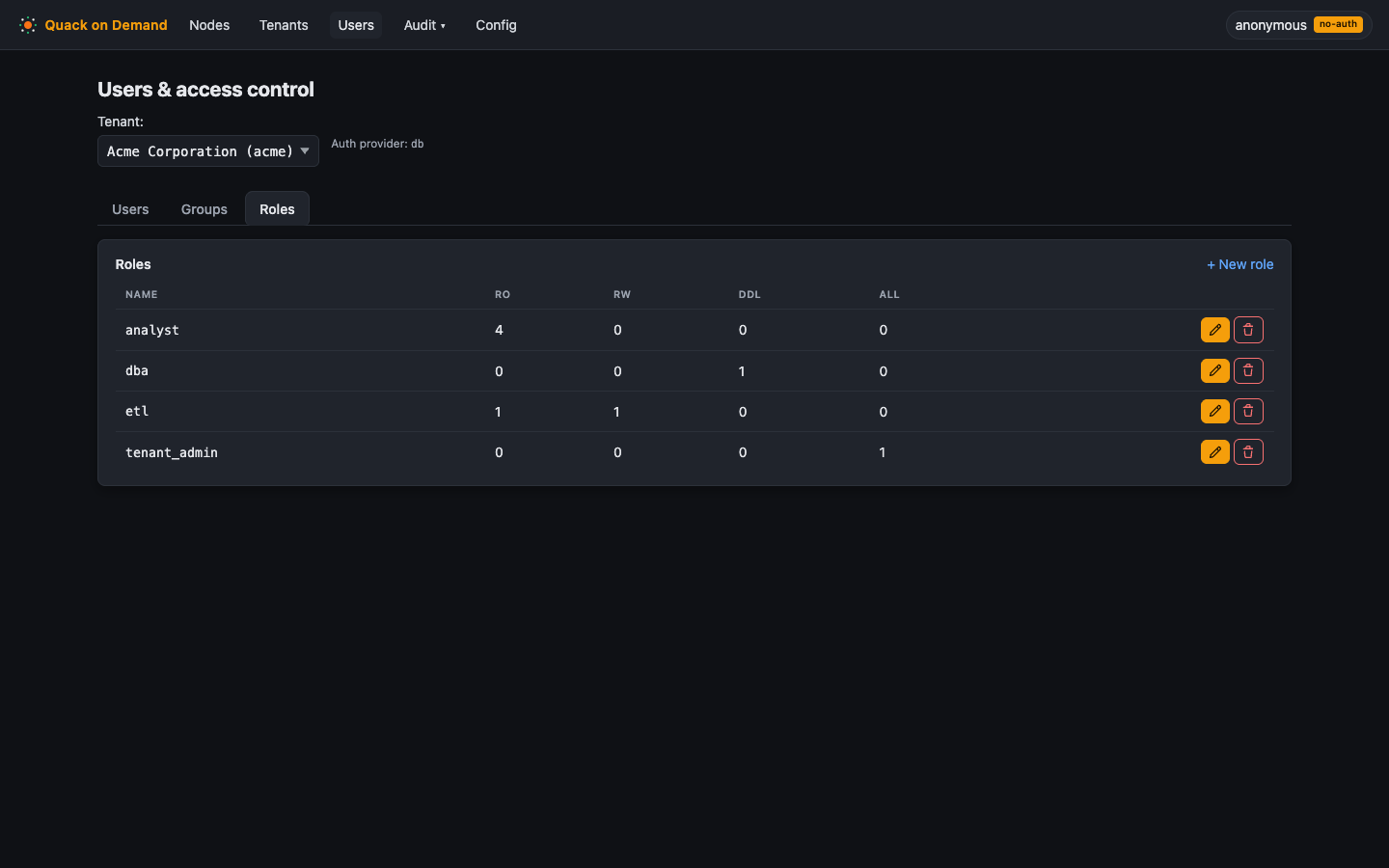
-
Go to the Groups tab and click + New group. Name it (for example
bi-team). Add thebi-readersrole to the group. Save.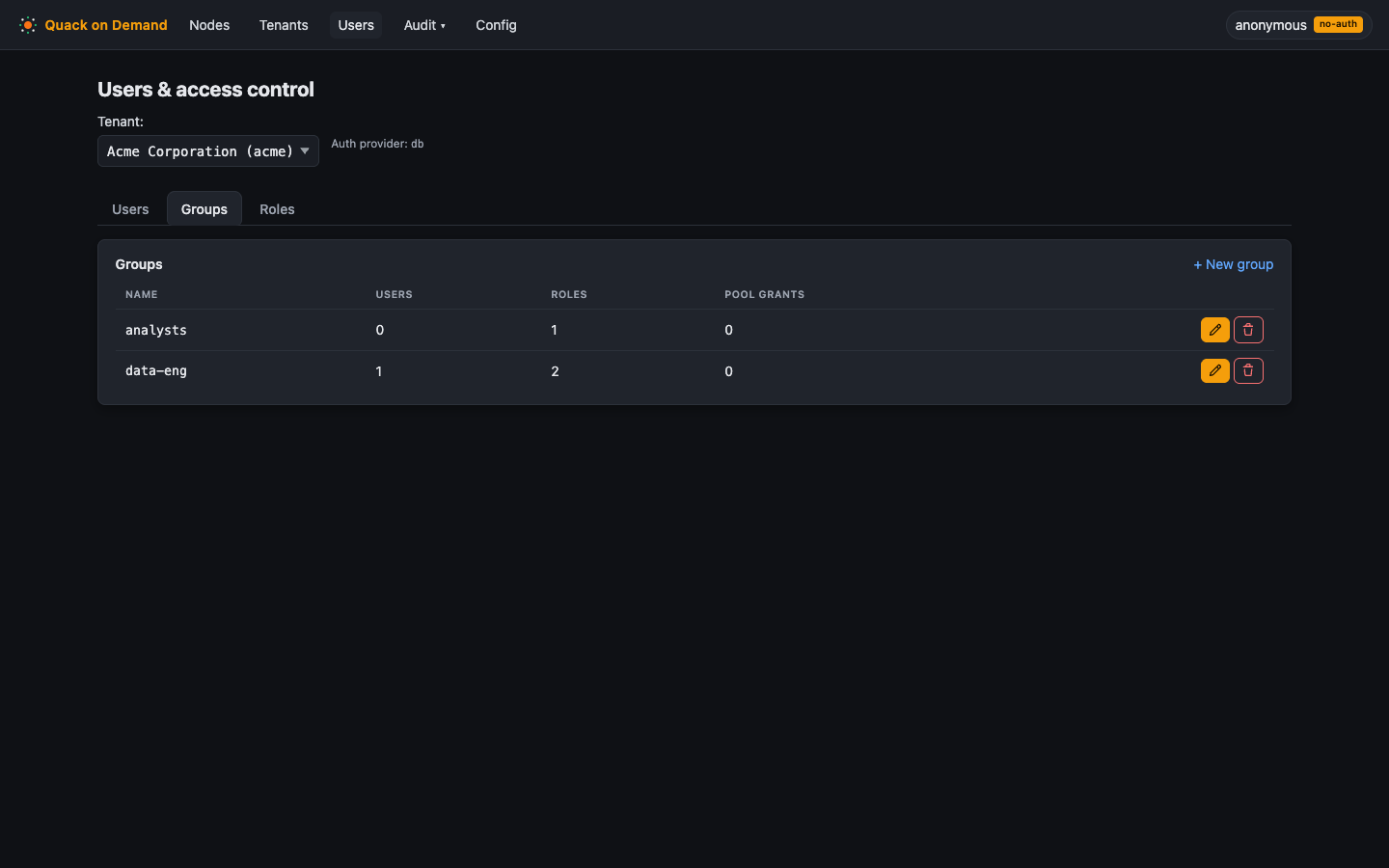
-
Go to the Users tab. For each user who needs access, open their record, assign them to the
bi-teamgroup, and add a pool grant for the target pool. The pool grant is required for the user to connect to that pool.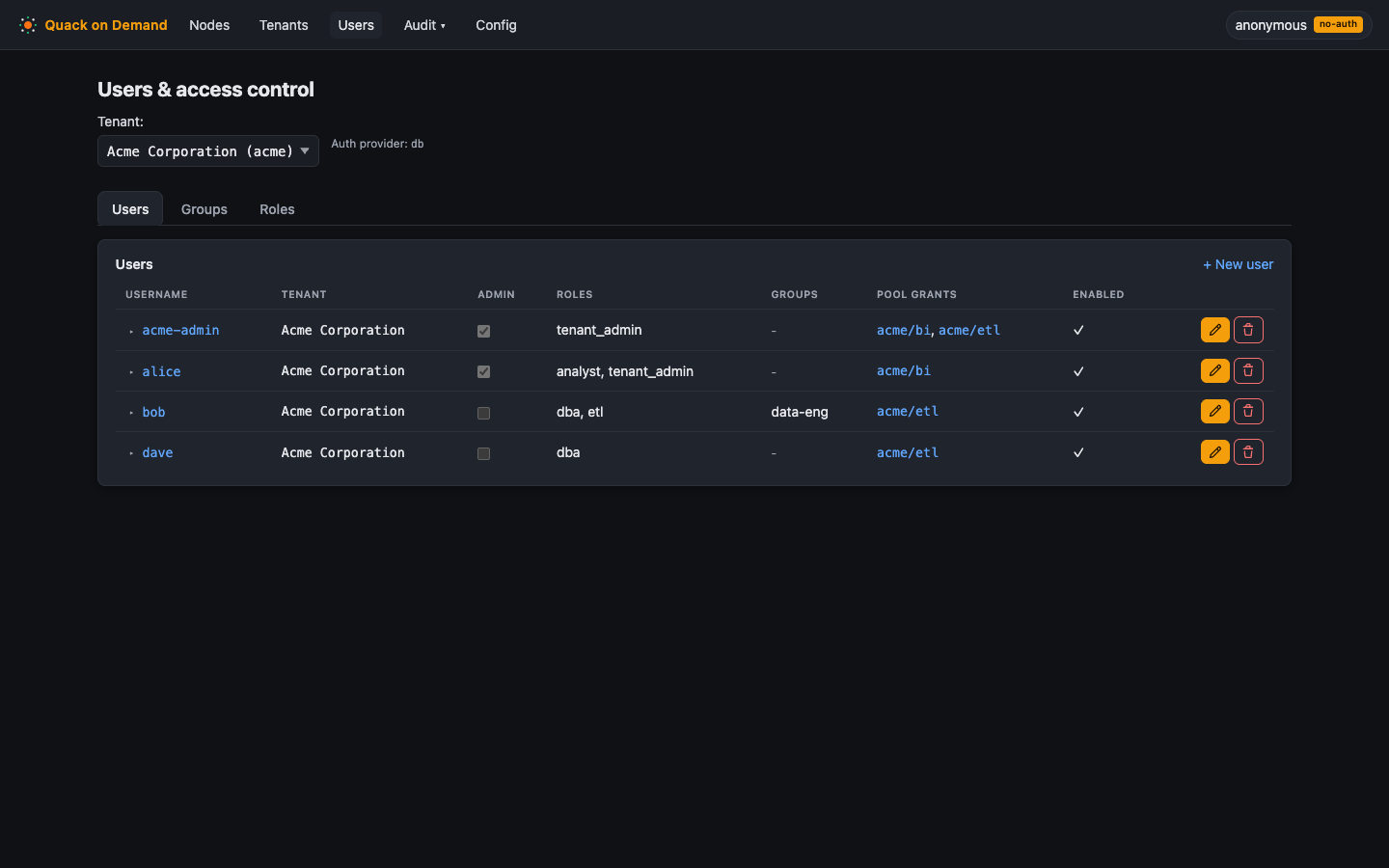
-
Confirm the pool grant: in the Users tab, verify the user's row shows the pool grant for the target pool.
Manifest (YAML)
roles:
  - tenant: acme
    name: analyst
    permissions:
      - { catalog: acme_tpch, schema: tpch1, table: customer, verb: RO }
groups:
  - tenant: acme
    name: analysts
    roles: [analyst]
users:
  - tenant: acme
    username: alice
    groups: [analysts]
    poolGrants:
      - { pool: bi }
CLI equivalent:
The examples below assume qod login has stored a session (see the CLI section); CI scripts can use QOD_API_KEY instead. The six steps below mirror the UI flow exactly. Surrogate ids (<roleId>, <groupId>, etc.) are returned by each create call; capture them with the --json flag.
# 1. Create a role
ROLE_ID=$(qod --json role create --tenant acme --name analyst --description "Read-only analyst" | jq -r .id)

# 2. Grant RO (read) on acme_tpch.tpch1.customer (repeat per table, or use "*" to wildcard any field)
qod role permission grant --role-id "$ROLE_ID" --catalog acme_tpch --schema tpch1 --table customer --verb RO

# 3. Create a group
GROUP_ID=$(qod --json group create --tenant acme --name analysts | jq -r .id)

# 4. Attach the role to the group
qod membership group-role add --group-id "$GROUP_ID" --role-id "$ROLE_ID"

# 5. Add a user to the group (or use `qod membership user-role add` to attach the role directly to a user)
#    Retrieve <userId> from `qod user list --tenant acme`
qod membership user-group add --user-id <userId> --group-id "$GROUP_ID"

# 6. Grant the group access to the pool (REQUIRED - without this the group cannot reach the pool)
#    Retrieve <poolId> from `qod pool list`
qod pool permission grant --tenant acme --pool-id <poolId> --group-id "$GROUP_ID"
The permission graph is: user -> roles (direct), user -> groups -> roles (via group membership), plus a required pool permission that gates which pools the principal can reach.
Verify: See Verify access below.
Related:
- Access control model - verbs, wildcards, effective-set resolution
- Administering access - full RBAC CRUD reference
Grant DML or DDL
Goal: Let a role run INSERT, UPDATE, DELETE, or schema-altering statements.
Prerequisites: A role already exists (or follow the steps above to create one).
Steps (UI):
- Open Users > Roles tab and click the edit icon on the target role.
- Add one or more table permissions with the appropriate verb:
RWfor DML (INSERT, UPDATE, DELETE, MERGE, TRUNCATE) - it also covers reads on the same tableDDLfor schema changes (CREATE, DROP, ALTER)ALLto cover every verb at once
- Save. The verbs are collapsed to
Read,Write, orDdlat enforcement time; see Access control model for the exact mapping.
Manifest (YAML)
roles:
  - tenant: acme
    name: loader
    permissions:
      - { catalog: acme_tpch, schema: tpch1, table: orders, verb: RW }
CLI equivalent:
# Grant RW (DML) on acme_tpch.tpch1.orders to an existing role
qod role permission grant --role-id <roleId> --catalog acme_tpch --schema tpch1 --table orders --verb RW

# Grant ALL verbs on every table in the catalog (wildcard schema and table)
qod role permission grant --role-id <roleId> --catalog acme_tpch --schema "*" --table "*" --verb ALL
Replace verb with DDL for schema changes as needed. Omitting catalog/schema/table (or setting them to "*") wildcards that field.
Verify: See Verify access below.
Related:
- Access control model - verb-to-category mapping and enforcement logic
Table name resolution
When ACL is on, a two-part name schema.table resolves against the session's default catalog (ANSI semantics): tpch1.customer works when the pool's database is acme_tpch and a grant covers acme_tpch.tpch1.customer.
DuckDB's runtime, however, tries a catalog interpretation of the first part first. So when the first part of a two-part name matches a possibly-attached catalog - the tenant-db itself, any federation alias (enabled or disabled), or the DuckDB built-ins memory / system / temp - the engine would bind it catalog-first while the ACL check just resolved it schema-first. Rather than guessing, the validator denies such names as ambiguous:
access denied: ambiguous two-part name 'acme_tpch.customer': 'acme_tpch' is an attached catalog; qualify fully as 'acme_tpch.<schema>.<table>'
Write the full three-part form (catalog.schema.table, e.g. acme_tpch.tpch1.customer) to proceed. This denial fails closed and is unconditional: no wildcard grant, including *.*.* ALL, admits an ambiguous reference.
After deleting a federated source, recycle the pool: running nodes keep the deleted alias attached until they exit, while the ambiguity guard no longer covers it. See Federation.
Revoke access
Goal: Remove a user's, group's, or role's access to a pool or table.
Prerequisites: The grant you want to remove exists and you know its ID (visible in the UI grant list or from the list endpoint).
Steps (UI):
- Open Users and select the tenant.
- To remove a pool grant: open the user's record in the Users tab, find the pool grant row, and click Remove.
- To remove a role from a group: open the Groups tab, edit the group, and delete the role assignment.
- To delete a role permission entirely: open the Roles tab, edit the role, and delete the permission row.
Effect on active sessions: invalidateEffectiveCache() is called on every RBAC mutation in PoolSupervisor. This drops the entire in-process EffectiveSet cache immediately, so the revoked grant takes effect on the next handshake - there is no TTL window to wait for.
Manifest (YAML): Declaratively, remove the entry from its parent's nested list (a permissions entry on the role, or a role/group/grant on the user) and re-import; nested collections are replaced to match the file, so the omitted entry is deleted. Top-level roles, groups, and users are upsert-only, so this prunes grants, not whole roles. See Manage by manifest.
CLI equivalent:
# Remove a table permission from a role (get <permissionId> from `qod role permission list`)
qod role permission revoke <permissionId>

# Detach a role from a group
qod membership group-role remove --group-id <groupId> --role-id <roleId>

# Remove a user from a group
qod membership user-group remove --user-id <userId> --group-id <groupId>

# Remove pool access from a group (get <id> from `qod pool permission list --tenant acme`)
qod pool permission revoke <id>
Verify: Re-run the relevant list command and confirm the entry no longer appears:
# List role permissions
qod role permission list --role-id <roleId>
# List pool permissions
qod pool permission list --tenant acme
Related:
- Administering access - full RBAC CRUD reference
Verify access
Goal: Confirm that a user sees exactly the rows and columns the policy intends - no more, no less.
Prerequisites: scripts/adbc.sh is available (ships in the repo). The tenant, pool, and at least one data table exist.
Steps (CLI - two-realm diff):
Run the same query twice: once as the tenant user (policy enforced) and once as the bootstrap superuser (policy bypassed). Diff the outputs to see exactly what the ACL, column policy, or row policy filtered or masked.
# Query as a tenant user (Basic auth + tenant/pool routing headers).
# --insecure trusts the edge's self-signed dev cert.
scripts/adbc.sh --url grpc+tls://localhost:31338 \
  --user alice --password demo-alice \
  --tenant acme --pool bi --insecure \
  --query "SELECT c_mktsegment, count(*) FROM tpch1.customer GROUP BY 1 ORDER BY 1"

# Same query as the bootstrap superuser (system realm) -- bypasses RLS/CLS,
# so diffing the two outputs shows exactly what a policy filtered or masked.
scripts/adbc.sh --url grpc+tls://localhost:31338 \
  --user root --password demo-root \
  --tenant acme --pool bi --superuser --insecure \
  --query "SELECT c_mktsegment, count(*) FROM tpch1.customer GROUP BY 1 ORDER BY 1"
Note: scripts/adbc.sh is a CLI tool, not a REST call. It speaks the FlightSQL wire protocol over gRPC. On first run it provisions an ADBC Python venv under ${QOD_ADBC_VENV:-$HOME/.cache/qod-adbc/venv}; set PIP_PROXY if you are behind a proxy.
Verify: The diff between the two outputs should match the intended policy - the tenant user's result should contain only the rows and columns the grant allows. If the outputs are identical, check that QOD_ACL_ENABLED=true is set; ACL is off by default.
Related:
- Access control model - how the effective set is resolved
- Sessions and transactions - session lifecycle and handshake timing